Have you ever stared at your router and noticed a small button labeled WPS, wondering what it actually does? I remember the first time I saw it and thinking, “Is this some secret tech magic?” 🤔 WPS can seem confusing at first, but it’s actually a handy feature designed to make connecting devices to Wi-Fi much easier.
WPS stands for Wi-Fi Protected Setup. It’s a friendly and simple way to connect your devices to your Wi-Fi network without entering a password manually.
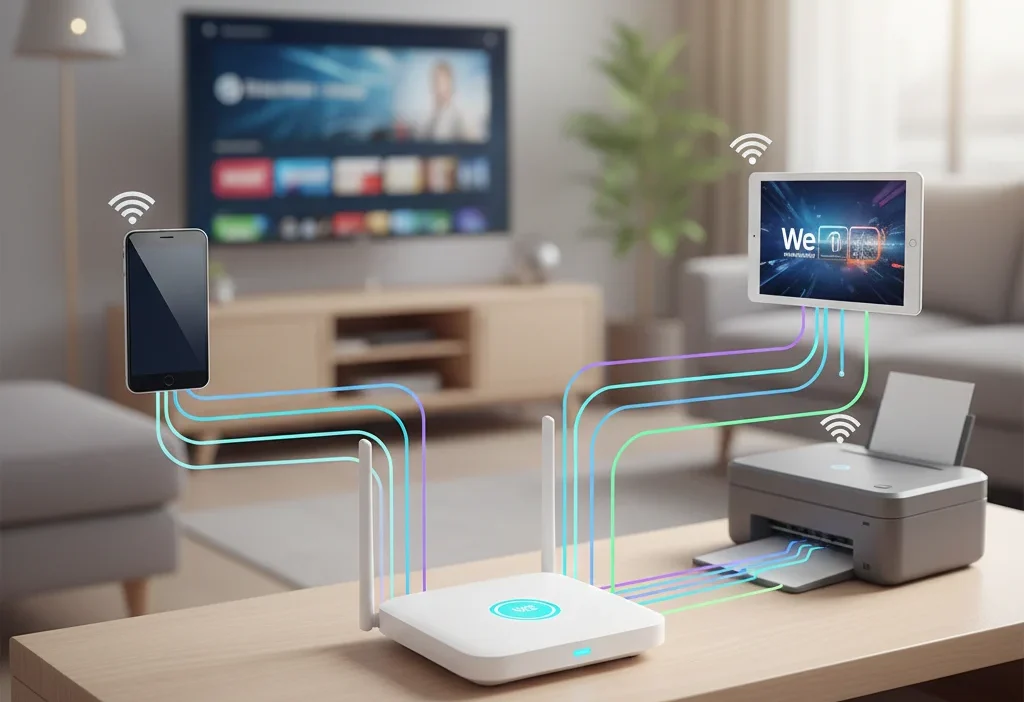
Whether you’re adding a smart TV, a printer, or your phone, WPS can save you time and hassle — but it’s important to know how and when to use it safely.
What Does WPS Mean on a Router?
WPS, or Wi-Fi Protected Setup, is a network security standard that allows devices to connect to Wi-Fi quickly and securely. Instead of typing your network password, WPS lets you join a network by pressing a button or entering a short PIN.
Example:
Imagine you’re setting up your smart TV. Instead of typing a long Wi-Fi password, you just press the WPS button on your router, and the TV connects automatically.
In short: WPS = Wi-Fi Protected Setup = easy and secure Wi-Fi connection without typing passwords.
How Does WPS Work?
There are two main WPS methods:
- Push-Button Method (PBC)
- Press the WPS button on your router.
- Activate WPS on your device.
- Devices connect automatically.
- ✅ Fast and secure for home use.
- PIN Method
- Enter an 8-digit PIN from the router into your device.
- Device joins the network.
- ❌ Less secure if the PIN is exposed.
WPS is designed to make connecting multiple devices quick and simple, especially for devices that don’t have keyboards or easy input methods.
Where Is WPS Commonly Used?
WPS is mostly seen in:
- 🏠 Home Wi-Fi Networks – for smartphones, tablets, and smart home devices.
- 🖥️ Smart TVs and Gaming Consoles – connecting without typing a password.
- 🖨️ Printers – wireless printing becomes fast and easy.
- 📶 Other IoT Devices – smart speakers, cameras, or home hubs.
Tone: Casual, friendly, home-use oriented. Not suitable for business-critical or public networks.
Examples of WPS in Action
Here are realistic chat examples you might see online:
Example 1:
A: “I can’t find my Wi-Fi password 😩”
B: “Press the WPS button on the router, it’ll connect automatically!”
Example 2:
A: “My printer won’t connect”
B: “Hit WPS and it should sync in seconds 😄”
Example 3:
A: “Do I need the password for my TV?”
B: “Nope, WPS does it for you 👍”
Example 4:
A: “Is it safe to use WPS?”
B: “Yes, for home devices it’s totally fine 😎”
Example 5:
A: “This is much faster than typing the password!”
B: “Exactly, that’s why WPS exists 🎉”
When to Use and When Not to Use WPS
✅ When to Use
- Connecting devices at home
- Temporary connections for guests
- Devices without keyboards (TVs, printers, smart gadgets)
❌ When Not to Use
- Public Wi-Fi networks
- Business networks with sensitive data
- If you are concerned about potential security risks
| Context | Example Phrase | Why It Works |
|---|---|---|
| Home Chat | “Just press WPS and connect 😄” | Casual & friendly |
| Work Chat | “Please enter the password” | Polite & professional |
| “Connect via the network credentials” | Formal & secure |
Pros and Cons of Using WPS
Pros:
- Saves time and effort
- No need to memorize passwords
- Perfect for smart home devices
Cons:
- Slightly less secure than manual password entry
- PIN method can be vulnerable
- Not all routers support WPS
Common Problems With WPS
- Device doesn’t connect – Sometimes the router or device may not support WPS.
- Security concerns – WPS PIN can be exploited by hackers.
- Limited range – Must be close to the router for push-button WPS.
- Disabled by default – Some modern routers disable WPS for security reasons.
Tip: Always check your router manual and ensure devices support WPS before using it.
Similar Network Features or Alternatives
| Feature | Meaning | When to Use |
|---|---|---|
| Wi-Fi Password | Traditional login with SSID & password | Most secure method |
| QR Code Wi-Fi | Scan QR code to connect | Smartphones, guest devices |
| MAC Filtering | Allow only certain devices | Advanced home security |
| WEP/WPA2 Keys | Manual security protocols | Older routers or secure setups |
How to Enable and Disable WPS
Enable WPS:
- Check router settings via web interface.
- Look for WPS or Wi-Fi Protected Setup.
- Turn it on.
Disable WPS:
- Go to router admin panel.
- Find WPS settings.
- Turn it off if concerned about security.
Tip: Disabling WPS is recommended for high-security networks.
Tips for Using WPS Safely
- Prefer the push-button method over the PIN method.
- Only enable WPS when needed, then disable it.
- Use WPS at home, never on public networks.
- Keep your router firmware updated to patch vulnerabilities.
FAQs About WPS
Q1: Is WPS safe to use?
Yes, for home networks it’s generally safe. Avoid using it on public Wi-Fi.
Q2: Which devices support WPS?
Smartphones, tablets, printers, smart TVs, gaming consoles, and some laptops.
Q3: My device doesn’t connect via WPS. What should I do?
Ensure your router supports the WPS method and try manually entering the Wi-Fi password.
Q4: Can WPS be hacked?
The PIN method is vulnerable. Push-button WPS is safer.
Q5: How do I disable WPS?
Access your router settings and turn off WPS to increase security.
Q6: Does WPS work with all Wi-Fi routers?
No, some older or high-security routers may not support WPS.
Q7: Can WPS be used for multiple devices at once?
Yes, but each device must connect separately within the WPS activation window (usually 2 minutes).
Conclusion
WPS is a quick, simple, and home-friendly way to connect devices to Wi-Fi without typing long passwords. Perfect for smart TVs, printers, and IoT gadgets, it saves time and effort. However, for business or public networks, using strong passwords is a safer choice.
Next time you see that WPS button on your router, you’ll know exactly what it does — making connecting your devices almost effortless! 😄

Hiromi Kawakami is a contemporary dream analyst and spiritual writer who explores the intersection of everyday life and dream symbolism. Her approach blends gentle observation with mystical insight, guiding readers to understand the spiritual significance of their dreams. Hiromi encourages self-reflection through the subtle messages of the subconscious.